Scrivener alternative
An alternative to Scrivener that keeps your book in plain files.
Scrivener showed a generation of writers that a book is a structure, not one long document. Musset keeps that idea, with a calmer page and a book that stays a folder of ordinary text files.
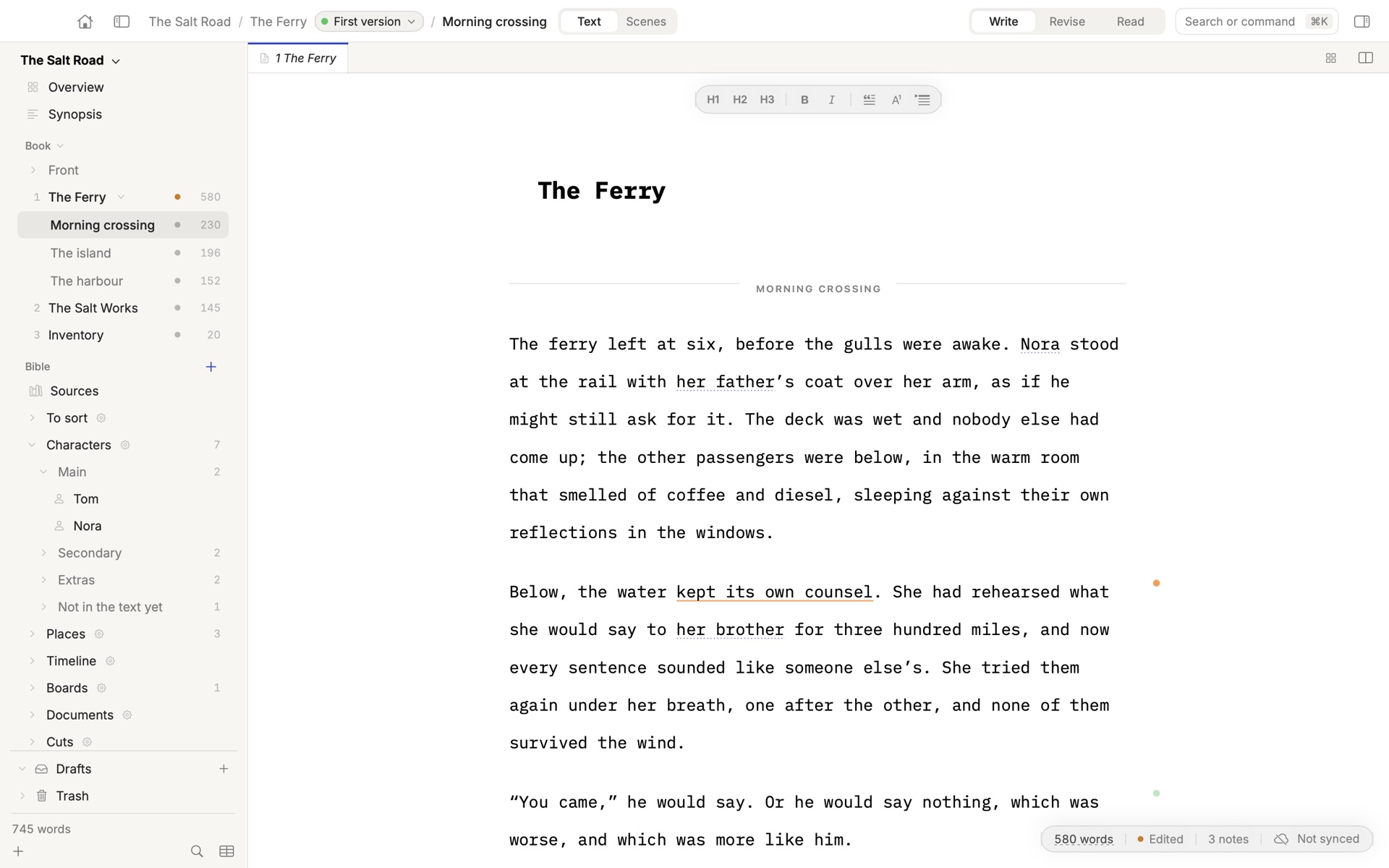
What you will recognise
If you write in Scrivener, the shape of Musset is familiar. The binder becomes a sidebar of parts, chapters and scenes. The corkboard becomes scene cards, with each scene’s whole text on its card. Character and location sketches become the Bible, with a sheet for each person and place, and cork boards to pin them on.
Snapshots become versions. Musset keeps every state of every chapter without being asked, shows two of them side by side, and lets you try a bold change on the whole book in a parallel draft while the real manuscript does not move.
Musset and Scrivener, side by side
| Musset | Scrivener | |
|---|---|---|
| Price | Free during the beta. US$9.90 once from version 1.0. | US$59.99 once for Mac, as stated by its maker. Windows and iOS are separate purchases, and major upgrades are paid. |
| Runs on | Mac only: macOS 14 or later, Apple silicon. | Mac (macOS 11 or later), Windows, and iPhone and iPad. |
| Your book on disk | A folder of plain Markdown files, one per chapter. Any editor can open them. | A .scriv project. The text can be exported or synced to an external folder for other apps. |
| Structure | Parts, chapters and scenes, scene cards, a Bible for characters and places, cork boards. | Binder, corkboard with index cards, outliner, character and location templates, writing targets. |
| Versions | The whole history is kept in git. Two versions of a chapter side by side, and parallel drafts of the whole book. | Snapshots of a document, taken by hand, with a comparison of changes. |
| From draft to publisher | A typeset book as PDF, each language’s manuscript format, EPUB and Word. | Compile to Word, RTF, PDF, EPUB, Kindle and Final Draft, with fine control over formatting. |
| Grammar and spelling | LanguageTool, running on your Mac, in six languages. Nothing is sent anywhere. | Not described on the pages we read. |
| AI | Optional, through your own Claude or ChatGPT account. It reads, questions and annotates. It never writes or rewrites your text. | None. Its maker states that Scrivener contains no AI. |
| Keyboard and focus | Four keyboard modes: Mac, WordStar, vi and Emacs. Focus mode, typewriter scrolling, Ultra Focus. | Shortcuts and a full-screen composition mode. |
| Working with an editor | A round trip through Word with tracked changes. Optional Musset Sync (€4.99 a month) for invited readers and editors. | No simultaneous editing. Projects sync through Dropbox. |
| Source code | Open source under the GPL v3. | Closed source. |
Scrivener’s details were read on its maker’s own site on 18 November 2026: Scrivener features · overview · pricing note · AI statement. Tell us if something is out of date: [email protected].
Which one is for you
Choose Musset if
- You want your book to stay plain text files that any app can open, now and in twenty years.
- You want every version kept for you, and to read two of them side by side.
- You want a typeset book and your country’s manuscript format without learning a compiler.
- You write from the keyboard, perhaps in vi, Emacs or WordStar.
- You want an editor’s notes from an AI that never writes for you, or no AI at all.
Stay with Scrivener if
- You write on Windows, or on an iPad or iPhone.
- You write screenplays and need Final Draft export.
- You keep research inside the project: PDFs, pictures, web pages.
- You need the fine control of Compile for unusual formats.
- You want software with many years behind it. Musset is a beta.
What Musset does not do
Better to read it here than to find out in chapter twelve. Musset runs on the Mac only, and only on Apple silicon. It has no screenplay mode, it does not store research files inside the book, and it has nothing as deep as Compile.
Musset is also young. It is at version 0.4, free while it is a beta, and it changes every few weeks.
Moving a book from Scrivener
Musset opens Scrivener projects. On the welcome screen, choose Scrivener and pick your .scriv project. Your chapters become Markdown files in a folder you choose, and the first version of each is recorded from that moment.
Your Scrivener project is not touched. Start with a copy, and keep both until you are sure.
Write the book. Finish it.
Free during the beta. $9.90 once from version 1.0. Open source, and your book stays a folder of plain text files.
Download Musset — freemacOS 14 Sonoma or later · Apple silicon · Signed and notarized by Apple